地震波形数据是地震学中最重要的数据。这一节介绍如何使用 ObsPy 下载地震波形数据。
首先,需要导入 ObsPy 中地震数据中心数据下载客户端 ~obspy.clients.fdsn.client.Client
以及用于处理时间的类 ~obspy.core.utcdatetime.UTCDateTime:
from obspy.clients.fdsn import Client
from obspy import UTCDateTime
接下来,我们需要初始化一个 ~obspy.clients.fdsn.client.Client 对象。
ObsPy 的 Client 支持多个地震数据中心,这里我们选择使用
EarthScope SAGE 地震数据中心(前身为 IRIS):
client = Client("IRIS")/home/runner/micromamba/envs/seismo-learn/lib/python3.14/site-packages/obspy/clients/fdsn/client.py:251: ObsPyDeprecationWarning: IRIS is now EarthScope, please consider changing the FDSN client short URL to 'EARTHSCOPE'.
warnings.warn(msg, ObsPyDeprecationWarning)
我们以 2022 年 9 月 22 日发生在墨西哥的一个 Mw 6.8 级地震为例,申请该地震相关的 波形数据。该地震的基本信息为:
发震时刻:2022-09-22 06:16:09 UTC
经度:102.9518° W
纬度:18.247° N
深度:20.0 km
震级:mww 6.8
该地震的详细信息见 https://
下载单个波形数据
下载波形数据时需要提供两个最基本的信息:
下载哪个地震台站哪个通道的数据,即需要指定台网(
network)、台站(station)、 位置码(location)和通道码(channel)下载哪个时间段的数据,即指定数据开始时间(
starttime)和结束时间(endtime)
下面的代码使用 Client.get_waveforms() <obspy.clients.fdsn.client.Client.get_waveforms()>
函数申请了 IU.ANMO 台站的宽频带垂直分量(即 BHZ 通道)的波形数据。数据开始时间为
2022-09-22T06:18:00(即发震后约两分钟),结束时间为 2022-09-22T06:30:00,
数据总长度为 12 分钟(即 720 秒)。
starttime=UTCDateTime("2022-09-22T06:18:00")  # 定义开始时间
st = client.get_waveforms(
    network="IU",               # 指定台网名
    station="ANMO",             # 指定台站名
    location="00",              # 指定位置码
    channel="BHZ",              # 指定通道码
    starttime=starttime,        # 指定开始时间
    endtime=starttime + 720     # 指定结束时间
)
函数的返回值为 ~obspy.core.stream.Stream 类型,赋值给变量 st。
使用 print 函数可以显示变量 st 的值:
print(st)1 Trace(s) in Stream:
IU.ANMO.00.BHZ | 2022-09-22T06:18:00.019538Z - 2022-09-22T06:29:59.994538Z | 40.0 Hz, 28800 samples
可以看到~obspy.core.stream.Stream 类型的变量 st 中包含了一个波形
(即 一个 ~obspy.core.trace.Trace),该波形对应的 ID 为 IU.ANMO.00.BHZ,
数据采样率为 40 Hz,共计 28800 个数据点。
~obspy.core.stream.Stream 类提供了 Stream.plot() <obspy.core.stream.Stream.plot>
函数可以用于绘制波形。波形图的横轴为时间,纵轴为振幅:
st.plot();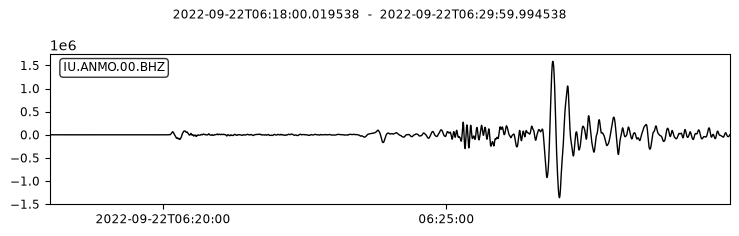
下载多个波形数据
network、station、location 和 channel 参数支持使用 UNIX 通配符,
以实现一次性下载多个波形数据的目的。通配符 ? 表示匹配单个字符,通配符 *
表示匹配零个或多个字符。
下面的代码中 channel 参数指定为 BH? 以下载宽频带三分量数据:
st = client.get_waveforms(
    network="IU",
    station="ANMO",
    location="00",
    channel="BH?",              # "BH?" 表示下载三分量数据
    starttime=starttime,
    endtime=starttime + 720
)
print(st)
3 Trace(s) in Stream:
IU.ANMO.00.BH1 | 2022-09-22T06:18:00.019538Z - 2022-09-22T06:29:59.994538Z | 40.0 Hz, 28800 samples
IU.ANMO.00.BH2 | 2022-09-22T06:18:00.019538Z - 2022-09-22T06:29:59.994538Z | 40.0 Hz, 28800 samples
IU.ANMO.00.BHZ | 2022-09-22T06:18:00.019538Z - 2022-09-22T06:29:59.994538Z | 40.0 Hz, 28800 samples
函数返回的 ~obspy.core.stream.Stream 中包含三个 ~obspy.core.trace.Trace。
其中 BHZ 为垂直分量,BH1 和 BH2 为两个水平分量。绘图结果如下:
st.plot();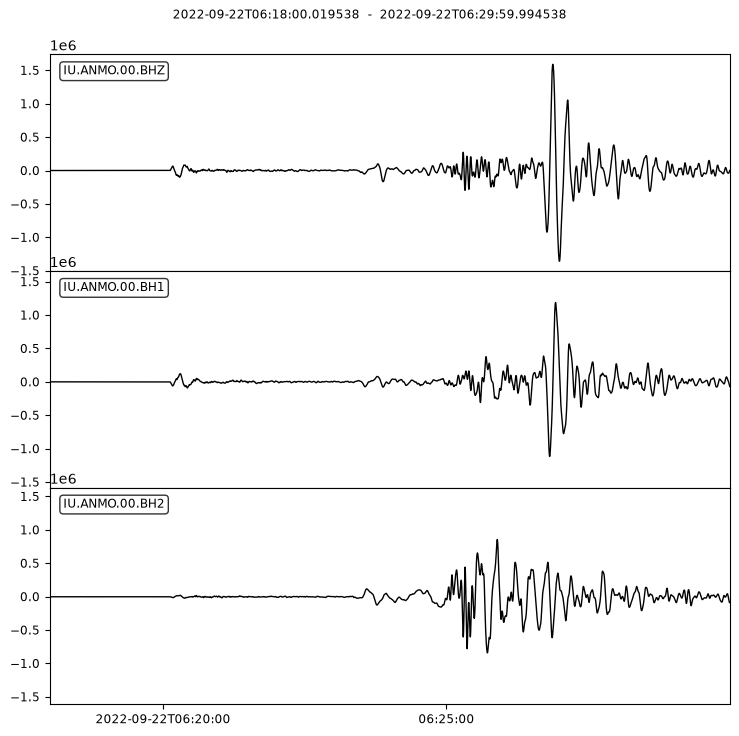
除了支持通配符外,这四个参数还支持用逗号分隔的代码列表。例如:
network="IU,IC"表示同时匹配IU和IC两个台网station="ANMO,HKT,TUC"表示匹配三个台站名location="--,00,01"表示匹配多个位置码,其中--表示位置码为空值channel="BH?,SH?,LH?"表示匹配宽频带、短周期和长周期三分量
下面的代码中同时下载了三个台站的宽频带垂直分量的波形数据:
st = client.get_waveforms(
    network="IU",
    station="ANMO,HKT,TUC",     # IU 台网的三个台站
    location="00",
    channel="BHZ",
    starttime=starttime,
    endtime=starttime + 720
)
print(st)
3 Trace(s) in Stream:
IU.ANMO.00.BHZ | 2022-09-22T06:18:00.019538Z - 2022-09-22T06:29:59.994538Z | 40.0 Hz, 28800 samples
IU.HKT.00.BHZ | 2022-09-22T06:18:00.019539Z - 2022-09-22T06:29:59.994539Z | 40.0 Hz, 28800 samples
IU.TUC.00.BHZ | 2022-09-22T06:18:00.019538Z - 2022-09-22T06:29:59.994538Z | 40.0 Hz, 28800 samples
函数返回的 ~obspy.core.stream.Stream 中包含三个 ~obspy.core.trace.Trace。
绘图如下。
st.plot();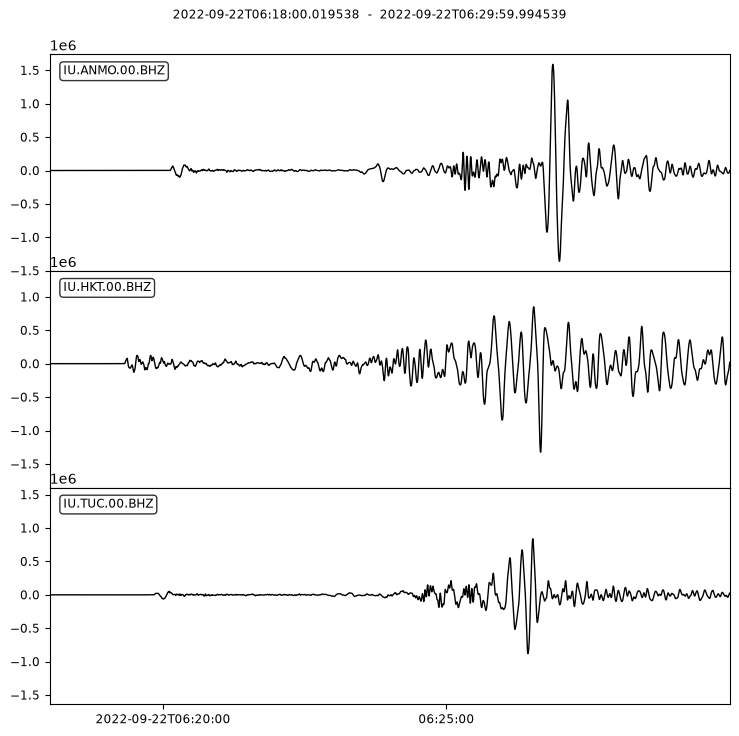
批量下载多个波形数据
上面的示例中,虽然使用 Client.get_waveforms() <obspy.clients.fdsn.client.Client.get_waveforms()>
可以一次性下载多个波形数据,但通配符本身不够灵活,且所有数据必须拥有相同的开始时间
和结束时间。
Client.get_waveforms_bulk() <obspy.clients.fdsn.client.Client.get_waveforms_bulk()> 函数
可以以更灵活的方式批量下载多个波形数据。该函数中最重要的参数是 bulk 参数。
该参数可以用多种不同的方式指定,包括:
列表。列表的每个元素为格式为
(network, station, location, channel, starttime, endtime)的元组符合 FDSN Web Service 文档所要求的请求字符串或文件
这里我们只介绍第一种方式。
bulk = [
    ("IU", "ANMO", "00", "BHZ", starttime, starttime + 720),
    ("IU", "HKT", "00", "BH?", starttime, starttime + 800),
    ("II", "PFO", "00", "BHZ", starttime + 100, starttime + 1200),
]
st = client.get_waveforms_bulk(bulk)
print(st)
5 Trace(s) in Stream:
II.PFO.00.BHZ | 2022-09-22T06:19:40.019538Z - 2022-09-22T06:37:59.994538Z | 40.0 Hz, 44000 samples
IU.ANMO.00.BHZ | 2022-09-22T06:18:00.019538Z - 2022-09-22T06:29:59.994538Z | 40.0 Hz, 28800 samples
IU.HKT.00.BH1 | 2022-09-22T06:18:00.019538Z - 2022-09-22T06:31:19.994538Z | 40.0 Hz, 32000 samples
IU.HKT.00.BH2 | 2022-09-22T06:18:00.019538Z - 2022-09-22T06:31:19.994538Z | 40.0 Hz, 32000 samples
IU.HKT.00.BHZ | 2022-09-22T06:18:00.019539Z - 2022-09-22T06:31:19.994539Z | 40.0 Hz, 32000 samples
在这个示例中,我们申请了 IU.ANMO.00.BHZ、IU.HKT.00.BH? 和 II.PFO.00.BHZ 的
波形数据,且每个波形数据的开始时间和结束时间均不同,最终申请得到 5 个波形数据。
绘图结果如下:
st.plot();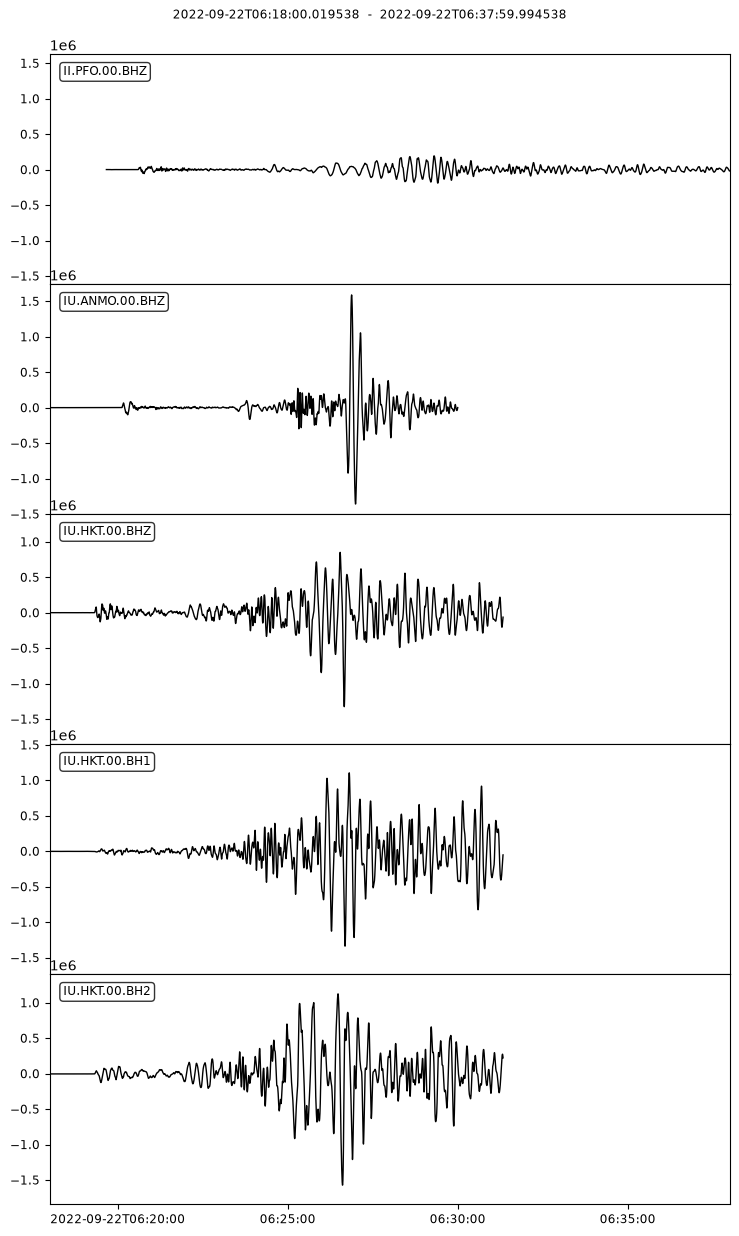
下载大量波形数据
上面的示例已经可以灵活地一次性下载多个地震波形数据,但要求用户必须自行准备 bulk 参数,
即用户需要首先获取地震和台站信息并对其进行筛选,然后自行构建 bulk 参数。在需要
下载大量波形数据时相对比较繁琐。
为了更方便地下载大量波形数据,ObsPy 提供了 obspy.clients.fdsn.mass_downloader 模块。
~obspy.clients.fdsn.mass_downloader 模块主要包含了三部分:
~obspy.clients.fdsn.mass_downloader.domain:根据位置信息筛选台站~obspy.clients.fdsn.mass_downloader.restrictions.Restrictions:用于设置波形数据的相关参数~obspy.clients.fdsn.mass_downloader.mass_downloader.MassDownloader:用于下载数据
下面通过两个示例介绍 ~obspy.clients.fdsn.mass_downloader 模块的基本用法。
更详细的用法参见官方文档。
下载地震波形数据
下面的示例展示了如何使用 ~obspy.clients.fdsn.mass_downloader.mass_downloader.MassDownloader
下载单个地震多台站的波形数据:
import obspy
from obspy.clients.fdsn.mass_downloader import CircularDomain, \
    Restrictions, MassDownloader

origin_time = obspy.UTCDateTime(2011, 3, 11, 5, 47, 32)

# 使用 CircularDomain 限定使用震中 30 到 40 度范围内的台站
domain = CircularDomain(
    latitude=18.247,
    longitude=-102.9518,
    minradius=30.0,
    maxradius=40.0
)

# Restriction 用于对波形进行进一步筛选
restrictions = Restrictions(
    # 设置波形的开始时间和结束时间
    starttime=origin_time,
    endtime=origin_time + 1200,
    # 丢弃所有数据中包含 gap(即存在中断)的数据
    reject_channels_with_gaps=True,
    # 实际获得的数据长度不小于数据申请的时间段长度的 95%
    minimum_length=0.95,
    # 通道优先级。当一个台站同时有 HH? 和 BH?数据时,优先下载 HH?数据
    channel_priorities=["HH?", "BH?"]
)

# 初始化
mdl = MassDownloader()
# 将数据下载到 waveforms 目录下,台站元数据下载到 stations 目录下
mdl.download(
    domain,
    restrictions,
    mseed_storage="waveforms",
    stationxml_storage="stations"
)下载连续波形数据
下面的示例展示了如何使用 ~obspy.clients.fdsn.mass_downloader.mass_downloader.MassDownloader
下载连续波形数据:
import obspy
from obspy.clients.fdsn.mass_downloader import RectangularDomain, \
    Restrictions, MassDownloader

# 限制台站位于一个矩形区域内
domain = RectangularDomain(
    minlatitude=30,
    maxlatitude=50,
    minlongitude=5,
    maxlongitude=35
)

restrictions = Restrictions(
    # 设置数据的开始时间和结束时间
    starttime=obspy.UTCDateTime(2012, 1, 1),
    endtime=obspy.UTCDateTime(2013, 1, 1),
    # 将数据分块,每块的长度为 86400 秒。即一天的数据保存到一个文件中
    chunklength_in_sec=86400,
    # 设置要下载的数据的 network, station, location 和 channel 信息
    network="BW", station="A*", location="", channel="EH*",
    # 不删除存在数据中断的数据
    reject_channels_with_gaps=False,
    # 不限制数据的最小长度
    minimum_length=0.0,
)

mdl = MassDownloader(providers=["LMU", "GFZ"])  # 设置地震数据中心列表
mdl.download(
    domain,
    restrictions,
    mseed_storage="waveforms",
    stationxml_storage="stations"
)其他地震数据申请软件
除了 ObsPy 外,还存在很多其他地震数据申请软件,包括但不限于:
不同的软件各有其利弊,读者亦可了解并学习这些软件,并根据具体需求使用合适的软件。