波形尖灭是指在信号首尾施加平滑衰减窗函数,使振幅在两端平滑过渡至零,从而减少因信号截断引起的频谱泄漏。
设原始信号为 、窗函数为 ,则尖灭后的信号可表示为:
其中 在信号首尾逐渐从 0 过渡到 1,并在中间区域保持为 1,实现波形的尖灭。
下图比较了两种常用的尖灭窗:余弦窗 (cosine) 与 Hanning 窗 (hann)。本示例中,两端各 5% 长度用于平滑渐入/渐出,中间部分保持幅度 1。
Source
import numpy as np
import matplotlib.pyplot as plt
from obspy.signal.invsim import cosine_taper  # ObsPy 余弦尖灭

# 参数设置
npts = 1000
p = 0.05  # 两端 5%

# 余弦尖灭窗
win_cos = cosine_taper(npts, p=p)

# Hanning 窗(构造两端平滑、中间平坦)
win_han = np.ones(npts)
edge = int(p * npts)
han_full = np.hanning(2 * edge)
win_han[:edge] = han_full[:edge]
win_han[-edge:] = han_full[-edge:]

x = np.linspace(0, 1, npts)
plt.figure(figsize=(9, 4))
plt.plot(x, win_cos, 'r-', lw=2, label=f'Cosine (p={p})')
plt.plot(x, win_han, 'b--', lw=2, label=f'Hanning (p={p})')
plt.xlabel('Normalized Time')
plt.ylabel('Amplitude')
plt.title('Cosine vs Hanning Taper Windows')
plt.legend()
plt.show()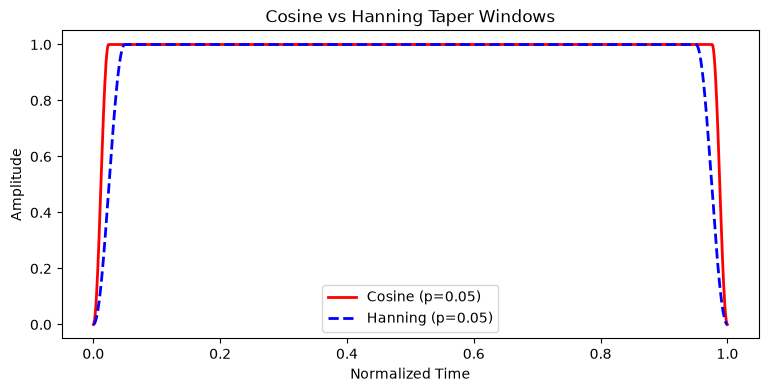
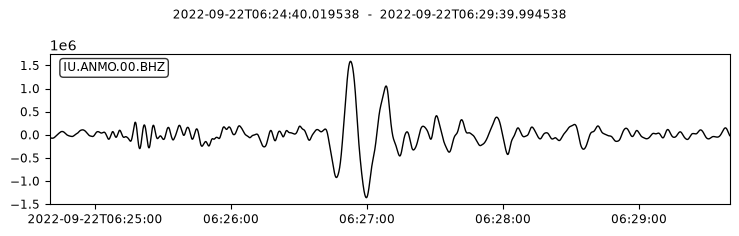
我们以前一节使用的 2022 年 9 月 22 日墨西哥 Mw 6.8 地震在 ANMO 台站的波形为例。
from obspy import UTCDateTime
from obspy.clients.fdsn import Client
import matplotlib.pyplot as plt

client = Client("IRIS")

# 下载 2022 年墨西哥 Mw 6.8 级地震在 ANMO 台站的波形数据(选择 400–700 s 时间窗)
origin_time = UTCDateTime("2022-09-22T06:18:00")
starttime = origin_time + 400
endtime = origin_time + 700
st = client.get_waveforms(
    network="IU",
    station="ANMO",
    location="00",
    channel="BHZ",
    starttime=starttime,
    endtime=endtime,
)
st.plot();
/home/runner/micromamba/envs/seismo-learn/lib/python3.14/site-packages/obspy/clients/fdsn/client.py:257: ObsPyDeprecationWarning: IRIS is now EarthScope, please consider changing the FDSN client short URL to 'EARTHSCOPE'.
warnings.warn(msg, ObsPyDeprecationWarning)
进行尖灭处理之前,通常先进行去均值、去线性趋势。
tr = st[0]

# 去均值 + 去趋势
tr.detrend("demean")
tr.detrend("linear")

tr_origin = tr.copy()   # 备份原始波形
波形尖灭可使用 ObsPy 的 obspy.core.trace.Trace.taper 实现。
在实际数据处理中,常使用 5% 的 Hanning 窗(taper 中的 type 参数默认即为 hann)。
本例中为了使尖灭的效果更明显,使用 10% 的 Hanning 窗(max_percentage=0.1):
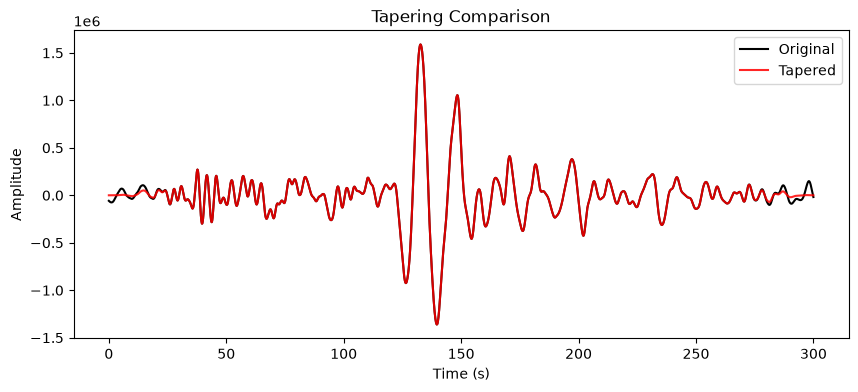
tr.taper(max_percentage=0.1, type="hann")IU.ANMO.00.BHZ | 2022-09-22T06:24:40.019538Z - 2022-09-22T06:29:39.994538Z | 40.0 Hz, 12000 samples下图演示了尖灭操作的效果:黑色和红色分别为尖灭操作前后的波形。可以看到,原始波形(黑) 在截断处存在“硬边界”,而尖灭后(红)两端平滑过渡至零,能有效抑制频谱泄漏。
plt.figure(figsize = (10, 4))
plt.plot(tr_origin.times(), tr_origin.data, 'k-', label='Original')
plt.plot(tr.times(), tr.data, 'r-', label='Tapered', alpha=0.85)
plt.xlabel('Time (s)')
plt.ylabel('Amplitude')
plt.title('Tapering Comparison')
plt.legend()
plt.show()